Prioritization paralysis & Good Strategy
{podcast worth sharing}

Key takeaway (starting at the 2:28 minute mark):
Good strategy demands focusing your limited resources on only the best opportunities. Spread those resources to thinly and you will fail to have an impact anywhere. This is known as the “Threshold Effect.” You have to apply enough effort to exceed the threshold for that effort to provide a return.
…[The Threshold Effect] is an effect well known in marketing. Unless a consumer is exposed to your advertising multiple times, it will have no impact. You have to exceed that threshold.

boagworldaudiobooCatch more from Paul Boag’s audioboo series here:
audioboo

All of the audioboo episodes are short.


boagworldcover170x170There is a longer show called Boagworld that you may want to check out as well.

itunes  ||   rss

Facebook contests and promotions
{quick reference}

Facebook Rules for contests and promotions:


Option 1 (not recommended):
Least techy option for running a facebook contest / promotion:

(NOT recommended because you are more likely to make a mistake and get your facebook page deleted)

For the facebook page post:

<insert general call to action text such as “like this photo for a chance to win”>

By participating in this promotion you agree to the Official Contest Rules:
<insert link to contest rules facebook note>

Disclaimer: This Promotion is in no way sponsored, endorsed or administered by, or associated with, Facebook. By participating, you hereby release and hold harmless Facebook from any and all liability associated with this promotion. You are providing your information to the Sponsor and its affiliates and not to Facebook.

For the Facebook Note that contains your contest rules: http://www.rocketlawyer.com/document/contest-rules.rl


Option 2 (recommended):

Use a facebook app that covers more of the details and process for you. Decreases your chances of violating 

Our top picks for contest apps:

  1. Rafflecopter
  2. Punchtab

Where this gets confusing for many people is the actual implementation on your facebook page if you are not already familiar with this process.

Don’t forget about including your contest somewhere on your website such as on your blog and other outlets like twitter, linkedin, and google+. 


Recommended reading as well as more contest app options: 

Why Rich Pins matter on Pinterest

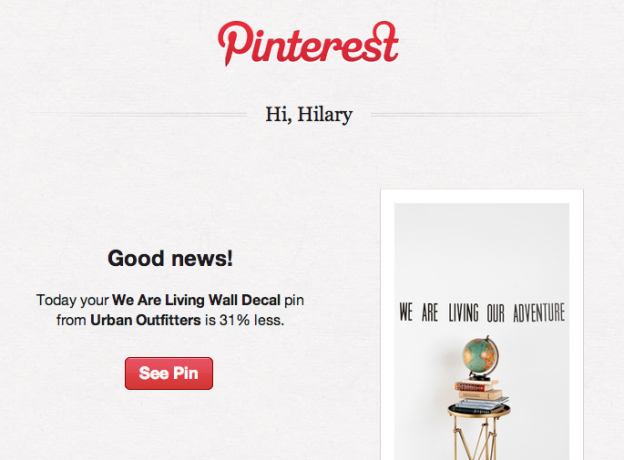
Why Rich Pins matter on PinterestTHIS is why Rich Pins matter on Pinterest – I received an email update for a price drop on a rich pin I had simply re-pinned. Automatic subscription. Automatic co-branding with Pinterest since the email comes from Pinterest, a trusted source.

The price is NOT in the text, it is part of a rich product pin originally created by Urban Outfitters. Info about Pinterest rich pins: http://business.pinterest.com/rich-pins/

Urban Outfitters appears to have updated the pin’s price so I was sent an email regarding the price change since I had re-pinned this item.

Screen capture above is of the email I was sent. Link below is to the pin itself: http://www.pinterest.com/pin/14425661277177260/

Pinterest marketing for business
Using Pinterest crash course

Pinterest Marketing for businesses – this is intended to be a crash course to Pinterest once you already have a general idea of what it is.

The Basics of Pinterest Marketing for Business

1) Before you pin anything:

  • Make sure you add your logo or profile image to the account.
  • Add a description about yourself and/or your business (depends on the size, type and branding of the business.)
  • Verify your website link in your profile. It will add a little check mark next to your URL that indicates you do in fact own that site and officially represent the site / business.
  • Add links to other social media accounts you are active on.

2)  Goal #1 – Show up in Pinterest search results :

People are more likely to click through on a pin than a profile link. As such, pinning something from your blog or website / ecommerce items is key to driving traffic to your website / business.

While Pinterest does not publish what affects their search results algorithm, many people have run tests that give a pretty clear picture of the things that most likely affect Pinterest’s search results.

The following will likely increase the chance that your pin will returns in pinterest search results:

  • Keywords / Keyword phrases Should be in the Description of Pins
  • Keywords / Keyword phrases Should be in the Name of the Picture / Photo File
  • The Number of Recent Re-pins Increase the odds your pin will return in someone’s search results
  • Keyword matching a keyword in the website it came from … not always possible / low priority. For most people I’m not going to recommend buying additional domain names for this minor factor. This does mean that you may want to include your website name in some pin descriptions however.
  • Keywords included in the name of the board that your pin is pinned to. Create and name your boards accordingly!  (And don’t forget to include a description for each board – the keywords in the descriptions of each board also matters.)


3) Goal #2 – Entice people to re-pin your pins

Things that affect the number of re-pins once they’ve found your pin:

  • Quality of the photos – with smart phone cameras and DSLRs in the hands of many business owners these days, you don’t always have to hire a professional. BUT you should learn to shoot a decent photo. Blurry and dark isn’t going to cut it.
  • Setting of the photos / photo surroundings: aka photo styling.  A page from Martha Stewart’s magazine is more interesting and more likely to be re-pinned than the typical white background stock photo. (This is not an absolute rule.)
  • Desirability / compelling content: Someone may re-pin something that they want even if they can not afford if. They might not buy from you but this may put the item in front of someone who can afford it and will buy from you. Make sure your photos and descriptions help create a desire for your product.


MORE ADVANCED – Develop a following on pinterest

AKA Why you should also cultivate a following on pinterest

  • to gain more re-pins
  • to develop brand loyalty
  • to develop business / brand awareness
  • develop and enhance your business / brand community
  • Not all re-pins come from people searching. Often they can come from people browsing the RECENT pins of the people & brands they follow. The more followers, the more eyes on your recent pins.
  • This means that regularly pinning new items is important since Pinterest displays recent pins first for people browsing versus searching.
  • Pinning the same image repeatedly to your account, even if it’s at a different time, is not recommended – it LOOKS spammy and people are less likely to re-pin anything that they THINK might be spam.
  • Pinning the same thing to multiple boards on your own account can often look spammy as well.
  • Creating different pin boards allows you to group like items and allow people to follow one thing if they are only interested in one thing. Or unfollow one board if they are uninterested in that one board (Ex: I unfollow “after school kids activities” type boards because it doesn’t interest me.)

This is just the SHORT crash course on getting started with Pinterest.

 Make sure you explore and educate yourself, make sure you think about what other people are getting out of your pins (not just “me me me!”), and most of all,  make sure you have some fun while you pin!

If this is overwhelming or you want some help getting started, Fascination Design does offer initial setup as well as social media coaching & management as one of our services. 🙂


Pinterest user demographics summary:

  • 15% of internet users use Pinterest
  • Women are 5x as likely as men to use Pinterest
  • Pinterest users are primarily 18-49 years old
  • Rural dwellers are more likely to use Pinterest than City dwellers (but not by that much)
  • Pinterest attracts higher education affluent women
  • with household incomes primarily over $74,999

Demographic information via Social media user demographics 2013 (utilizes PEW Research information): http://www.mediabistro.com/alltwitter/social-media-user-demographics_b38095

And in case you think that 15% of internet users isn’t enough to get your attention – that’s 70 MILLION Pinterest accounts and growing.


Related useful external articles on Pinterest for business:

More pinterest use stats:

Pinterest’s bookmarklet for your browser & the apps:

Optimizing pins on pinterest:

More advanced pins for products, recipes, and movies:

 

Behind the scenes: Paragraph Style Sheets & Nested Style Sheets in InDesign

This is NOT a tutorial but instead a simple snippet of designer life. A behind the scenes of some of the tasks I’m used to seeing on a regular basis that other people might be interested in knowing are possible. Today I’m going to share a little bit about Paragraph Style Sheets & Nested Style Sheets in InDesign. Creating new nested styles in InDesign while preserving some wingding characters … I think my brain should have exploded! — Hilary

Graphic design for print can sometimes seem as technical and geeky like coding for the web at times. I LOVE the existence of style sheets though for things like consistency in a directory with hundreds of business listings.

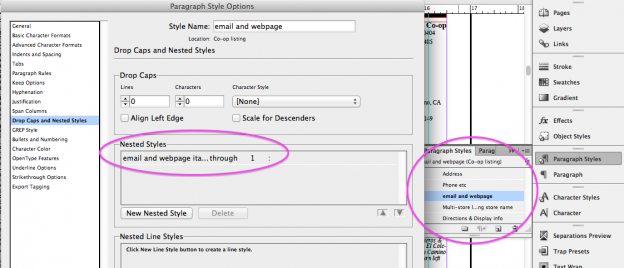
The screen shot is of just a single little portion of the styles and nested styles I was setting up this afternoon for a directory. What shown means that any text prior to a “:” in any line with the “email and webpage” style applied to it … that all text before the first “:” will be italics.

Behind the scenes Style Sheets and Nested Style Sheets in InDesign 2013-09-26 at 5.44.14 PM

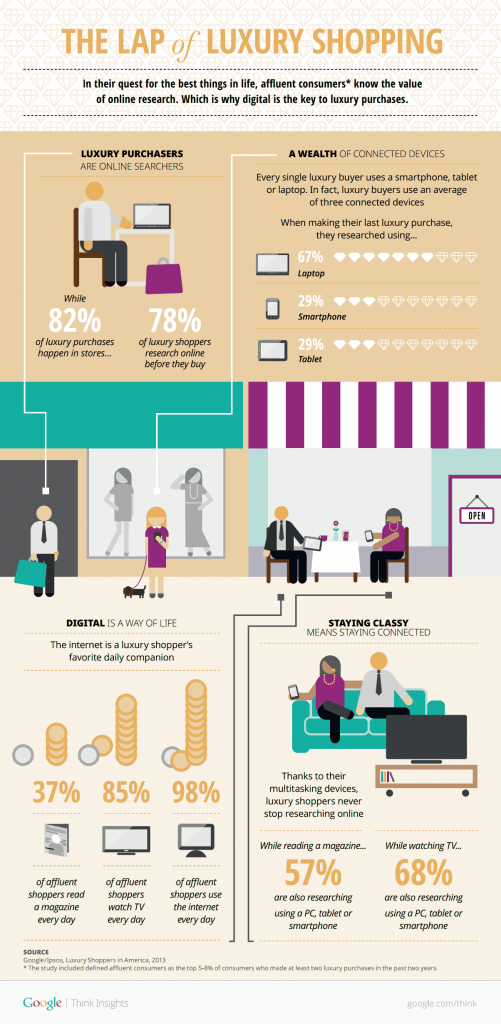
Luxury shoppers online shopping stats 2013

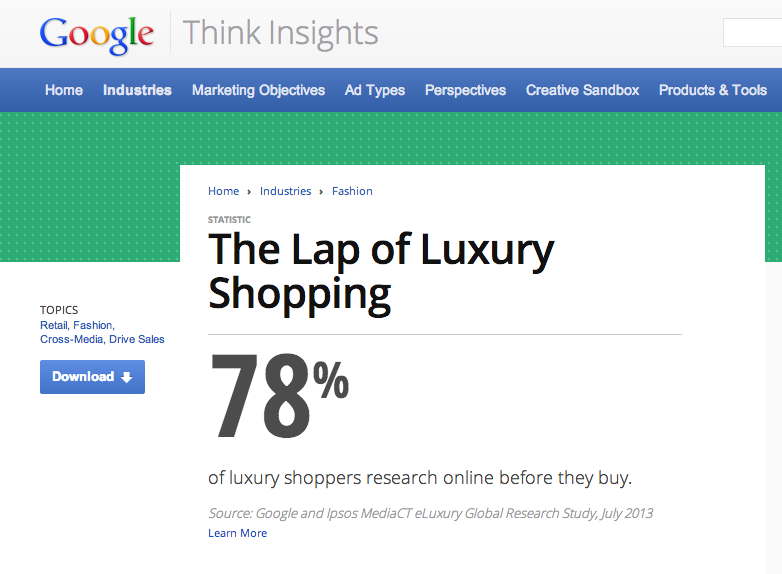
78% of luxury shoppers research online before they buy.
Yet 82% of luxury purchases are still made in stores.

Luxury shoppers online shopping stats 2013

Infographic source:
https://docs.google.com/viewer?url=http://ssl.gstatic.com/think/docs/lap-luxury-shopping_infographics.pdf&embedded=true

Click through for more info from Google Think Insights:
http://www.google.com/think/statistics/luxury-shopper-research.html

Related article:
http://www.google.com/think/research-studies/fashion-online-affluent-shoppers-luxury.html

Some keys for luxury purchases: superior quality, customized, distinguishable

Can you find us a WordPress Theme / Template to customize?

I realized that I’ve been putting off pulling together a website quote for someone because they asked me to “find them a WordPress template to buy.” Shopping for a template someone else created and dealing with it’s quirks and problem coding is not how I work.

With every template there’s the potential that someone did some coding poorly or in a way that will have a negative impact on the implementation of plugins. Choosing a poorly coded theme can cost more in both time, limitations and headaches and it’s hard to know what you’re dealing with before you buy and get involved with a theme.

Creating a child theme from the current WordPress theme (twentytwelve or now twentythirteen at the time I’m writing this) and heavily customized css is my typical workflow these days. There are also a few select others like the Genesis framework that have been heavily vetted by the WordPress community that we will work with.

No – your site does not need to look like these themes, that’s why we customize them heavily using child themes.

Why is this a better way of working?

  • These themes just give us a leg up to speed up the creation process so that we’re not starting completely from scratch.
  • These are themes that are built by, specifically for, and included with each WordPress release and have the core functionalities needed to utilize most of WordPress’s  power without having to start from scratch.
  • These themes are less likely to cause problems with well built plugins or have strange quirks that are hard to fix.

See our process for more information.

Employee leaving? What should you do about their email account?

email iconI highly recommend that if an employee leaves the company that you do NOT immediately delete their email account.

You should:
• change out the password
• consider backing up / archiving their email and contacts.
• set an “out of office” type message at the server level to tell people who they should now contact at your company.

Sample wording for an automated response message:

“Sue has moved on to another company and we wish her luck! Your new sales representative is Bob and he can be contacted at: bobsemail@companyname.com & 888-000-0000 ext 123 – We know you’re used to Sue so if needed, Bob would be happy to set up a meeting to get up to speed with your orders or simply get to know you better.”

Another thing to consider is being more proactive by immediately following up with all known contacts to let them know of this change. This may not catch everyone which is why I would still recommend the “out of office” type automated response message.

You should also consider leaving the old employee’s email account active for several months to a little over a year. Some things to consider when deciding how long to keep that email account active / an automated response active:
• how long they worked at the company.
• how important the employee’s contact’s might have been.
• how often people might regularly be in touch is another factor (annual order vs monthly order.)