++ Click Image to Enlarge ++

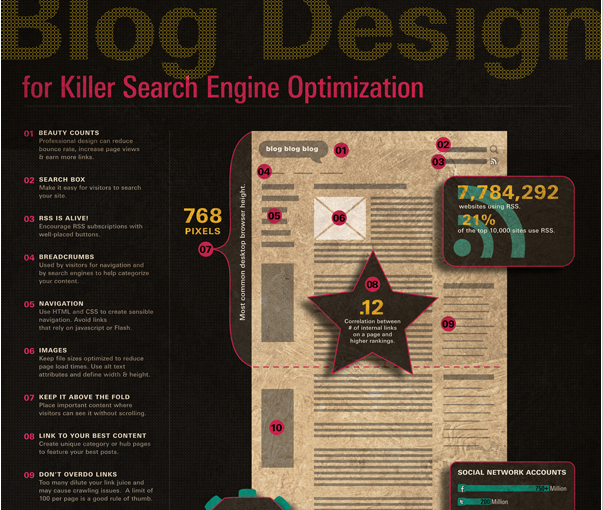
Source: What Makes Someone Leave A Website?
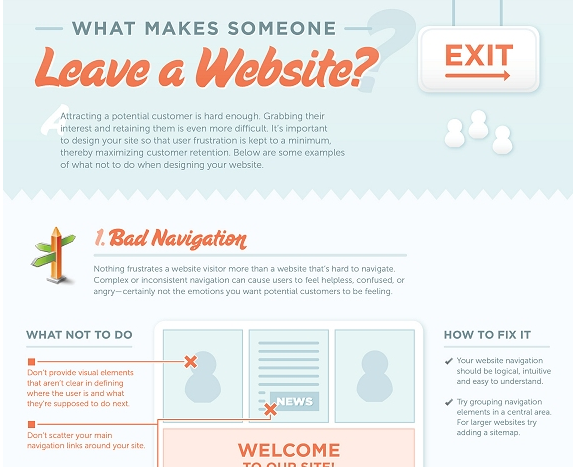
What Makes Someone Leave a Website?

graphic design, print, websites, logos, ads, publications, wordpress
++ Click Image to Enlarge ++
Source: What Makes Someone Leave A Website?


Dieter Rams’ Ten Principles of good design:
Good design is innovative.
Good design makes a product useful.
Good design is aesthetic.
Good design makes a product understandable.
Good design is unobtrusive.
Good design is honest.
Good design is long-lasting.
Good design is thorough down to the last detail.
Good design is environmentally friendly.
Good design is as little design as possible.
More videos and links about Dieter Rams:
http://www.fastcodesign.com/1662043/dieter-rams-the-god-of-pristine-minimalism
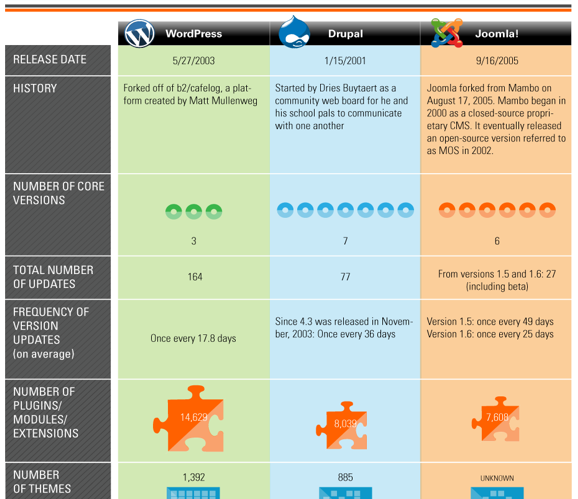
This is somewhat oversimplified but interesting infographic comparing the three opensource platforms.
Fascination Design uses both WordPress and Drupal based on the client’s needs. Joomla is also a good platform but it’s really an in-between solution which is why we chose to learn the two extremes. WordPress is easier to get started but not quite as robust as Drupal. And Drupal handles more customization and larger e-commerce sites better.
Quick note, there is also a difference between WordPress.com and WordPress.org. I’ll be doing a review and breakdown of that at a later date.

++ Click Image to Enlarge ++
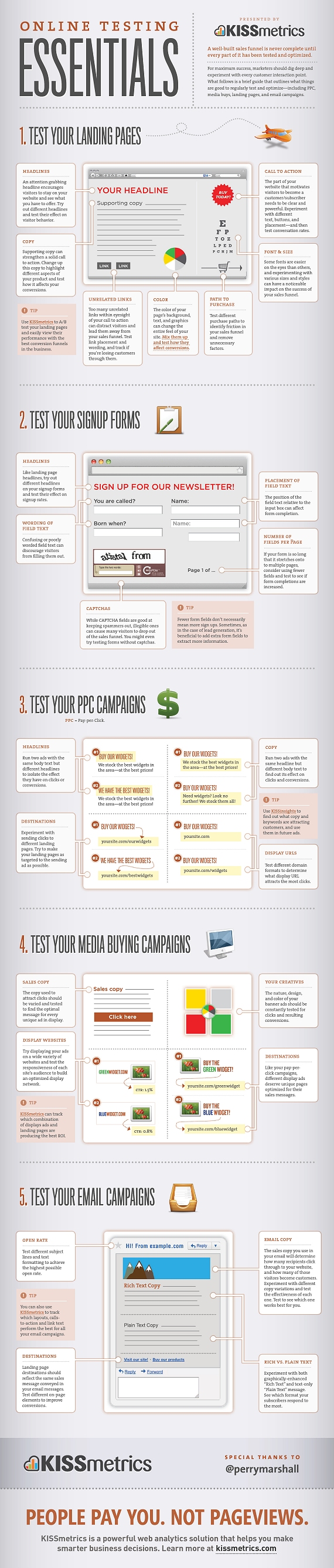
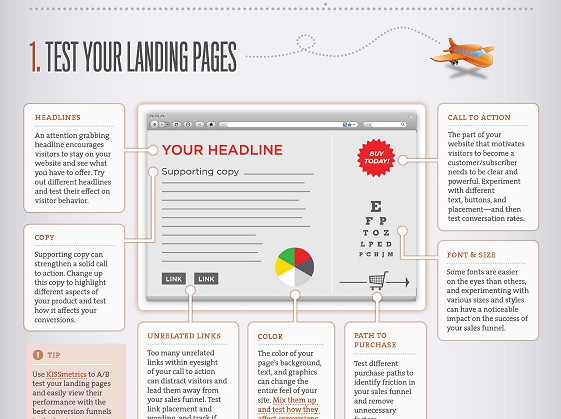
Source: Online Testing Essentials: An infographic on what online marketing activities to test.
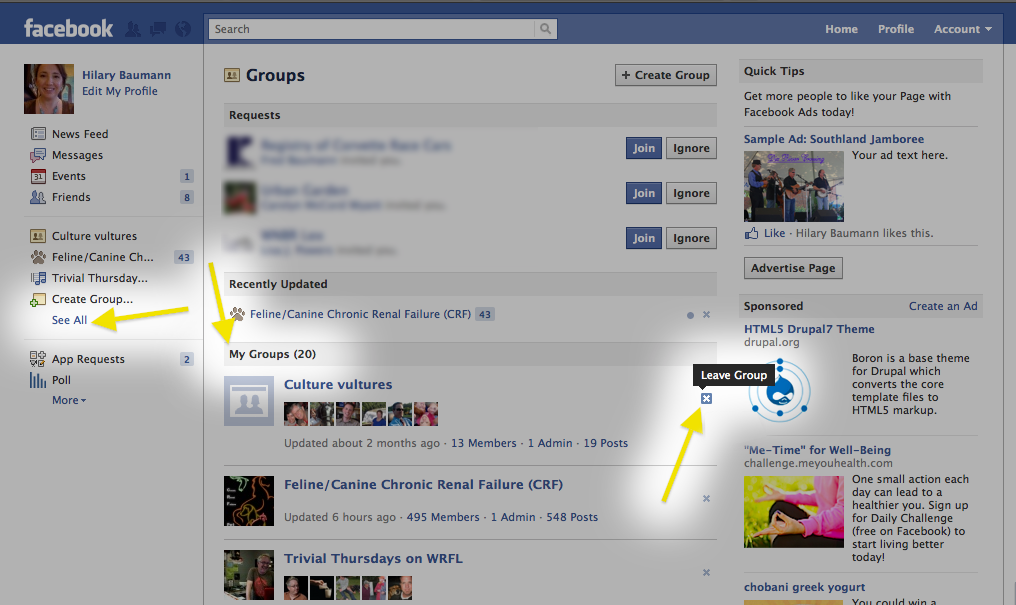
Just for illustration purposes, I was not leaving my friends! 🙂

 Quick checklist for Restaurants:
These are the places you should have information about your restaurant in order of importance.

Information you should include:
What you should post on a more regular basis will be determined by your food type, your business, your personal preferences AND how your customers interact with you online.
Common regular updates via social media for restaurants include:
A lot of these suggestions will also work for coffee shops, pubs, and bars.
Do NOT seed any of these website with fake reviews or overly complimentary reviews about your own restaurant. This is just tacky. Also, asking friends and family to post can sometimes be overkill as well. Too many “this is my favorite place!!!!!” reviews with no details is annoying to the readers. It’s better to let reviews happen naturally.
Reminder: If you change when you serve breakfast or any time you change your hours and other vital information, please be sure to post the new hours and info on all of your social networks and website. Don’t forget to update your website as well!
Extras:
For those with a little more time time, check out these additional social apps and services. Also you should review travel apps for
Lesser known or newer:
Some of these are more relevant for certain cities over others as well.
(List updated on Feb 1, 2014)
Update September, 2015: Urbanspoon was bought by Zomato and they ruined the interface. They might recover and they might still have enough users to warrant submitting info but I would focus on Yelp first. Also for the “lesser known or newer” section, I would flip through these: http://www.producthunt.com/e/future-of-food
If you accidentally blocked someone:
Go to your Home page > scroll down to the bottom > click on “edit options” > find the persons name hit the x and there posts will be posted back on your news feed next time they post something.
If you are having trouble getting to the bottom of your page, use the keyboard shortcut to get to to the bottom of the page: PCs this is usually the “end” key or hold down “ctrl” and “end” at the same time. This varies a bit on laptops and macs.
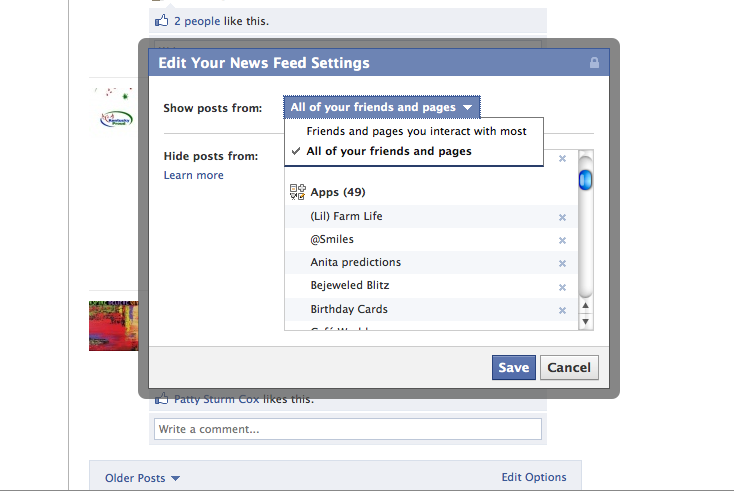
If you are not seeing all of the posts for someone or for a fan page there are two possible reasons:
The simple answer is that no, it’s not true. The biggest threat to AES encryption is poor choice of password.
AES is often confused with WEP which is easily crackable.
The more complicated answer is that nothing is 100% secure and anything is susceptible to attack. The most common security hole, which is not actually common, is a software bug that bypass the need to break the key. The key length and password chosen can help determine how likely it is to be cracked. Entry via brute force and dictionary attacks are different than the encryption method having flaws.
There is a theoretical weakness in AES but it has never been proven. Even if the weakness were proven, it would not reduce the time to crack it into a reasonable time-frame, IE less than the lifetime of the universe.
First impressions of Google Plus. I didn’t prep a script but tried to cover the basics to let people see how it works. Each video is 5 minutes or less.
Google+ demo series, what’s covered:
- Already invited? We’ve temporarily exceeded our capacity. Please try again soon.
- First screen
Videos:
- Home Page
- Circles
- Start a Hangout (screencast 1)
- Hangouts (past the plugin)
Continue reading “Google+ First Impression { includes video }”